„Since we started using Booklio, bookings are up 162%. Routine requests confirm themselves, and the bar staff can look after guests instead of the phone.“
 Operator of James Dean Prague
The most comprehensive booking system in the world.
We looked for the perfect booking system. There wasn’t one, so we built Booklio. Booklio is an AI reservation system for restaurants, bars, clubs and cafés. It works out free times from real table occupancy. It confirms requests on its own. Guests book through Claude and ChatGPT too. And dozens of other features you’ve only ever dreamed of... You just open the door.
And the best part: Booklio is free. All of it.
The form takes a booking for a time when nobody can be seated.
Who confirms them when everyone’s carrying plates?
The table stays empty and the numbers are missing.
Booklio connects guests, staff and management. Everyone sees only what they need.
A reservation system for restaurants, bars and cafés, and for nightclubs too. Same core, different needs: set Booklio up the way your venue runs.
Free times based on real table occupancy, booking length by space and room for walk-ins at peak times. The table QR code shows who most likely wrote a Google review, and Claude drafts the reply.
Restaurant reservation systems: prices comparedAn iPad admin behind the bar that rings. Bookings at the bar and at tables, one-tap confirmation, events and invitations for regulars.
Reservation system for barsLate-night times that belong to the previous day, booths and bottle tables paid upfront. Partner links and QR codes for hotels and hostels.
Reservation system for music clubsA simple widget with no deposit, gift cards and vouchers, bookings through guests’ AI assistants and a Monday summary of the week’s numbers.
Reservation system for cafésSee also the reservation system for bistros and reservation system for pubs and beer halls.
Bowling, spas, hair salons and more industries are coming soon. See what’s coming
Add the booking widget to your venue’s website with two lines of code. It takes the colours, fonts and corner radius of your site, or you pick one of four looks in the admin. The steps and checks stay the same. Try a booking; nothing gets sent.
How to add the booking form to your websiteSEE YOU SOON
Done, you’re confirmed! Your confirmation text is on its way.
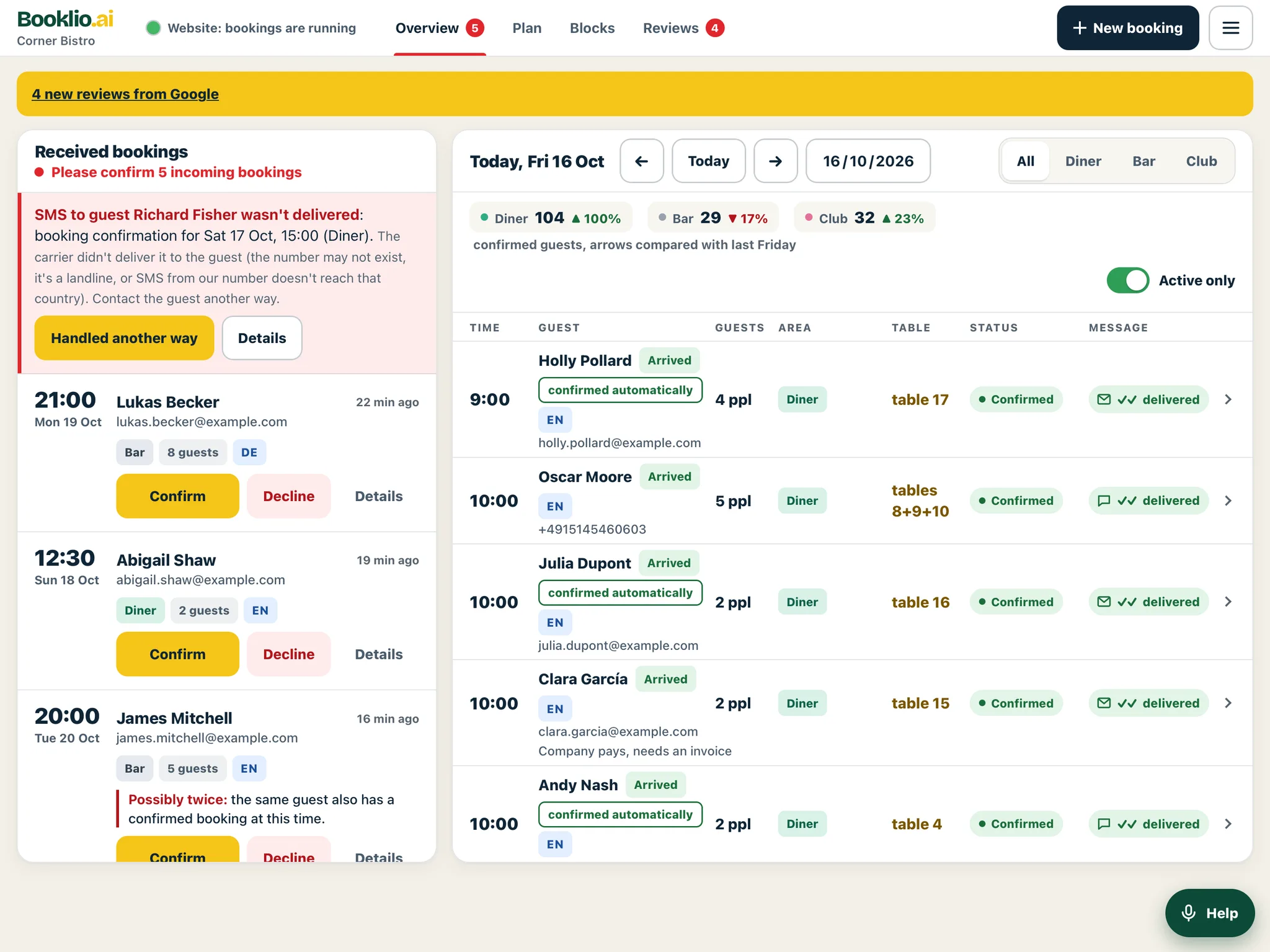
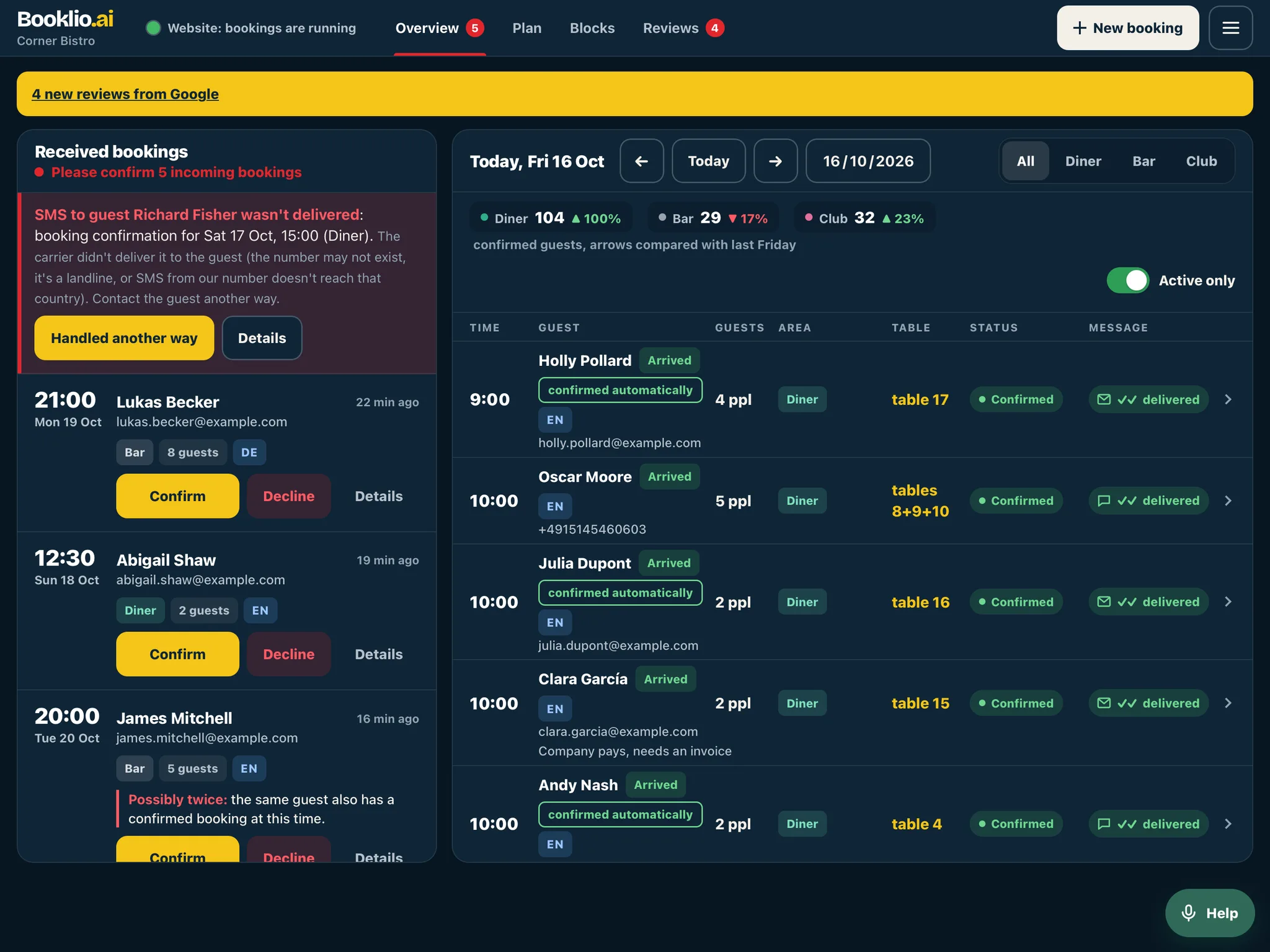
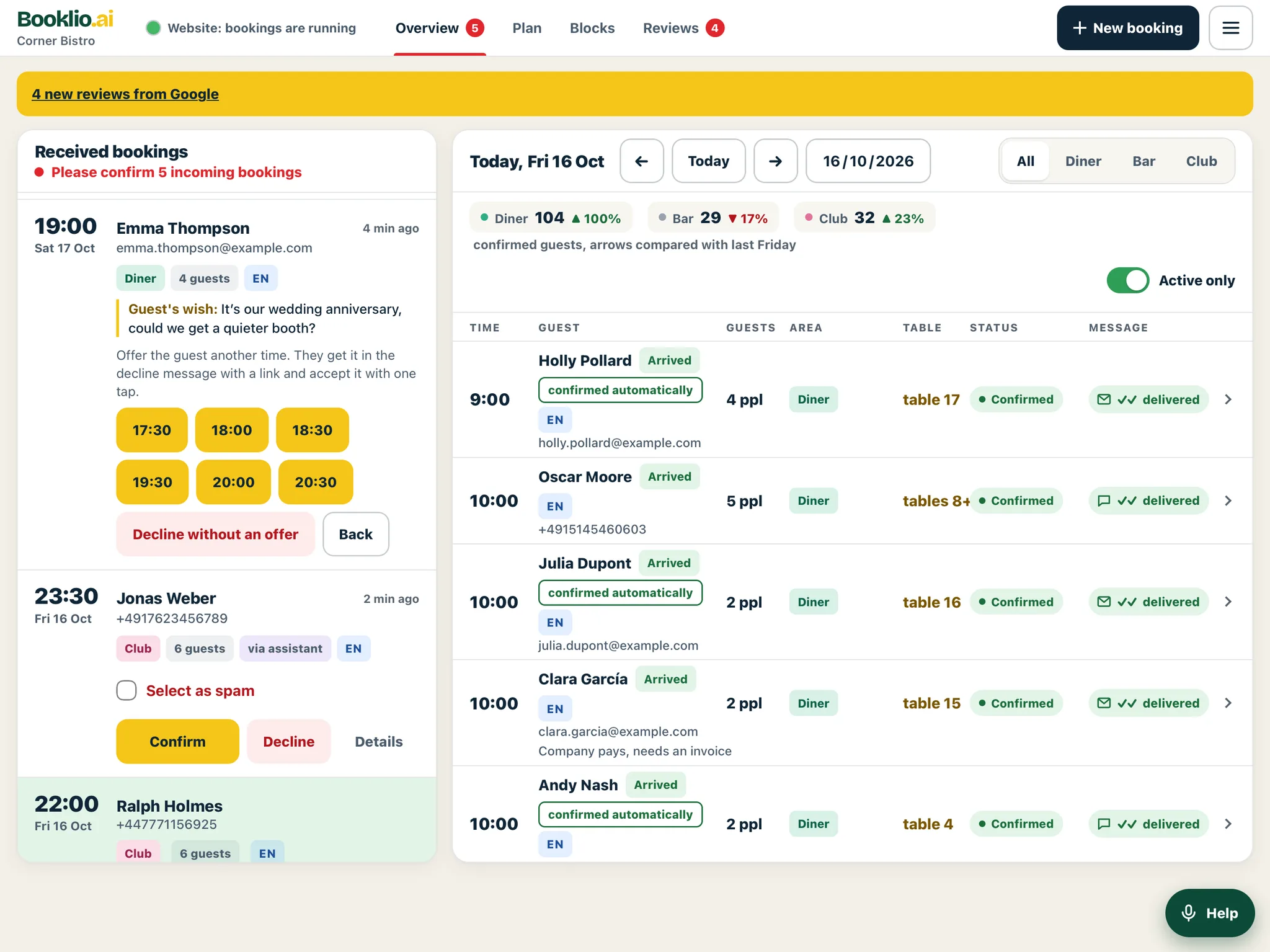
An electronic reservation book for your staff: the admin sits on the iPad home screen like an app. A new booking rings with an old cash-register bell, and alerts show up even on the lock screen. After dark it switches to night mode on its own.
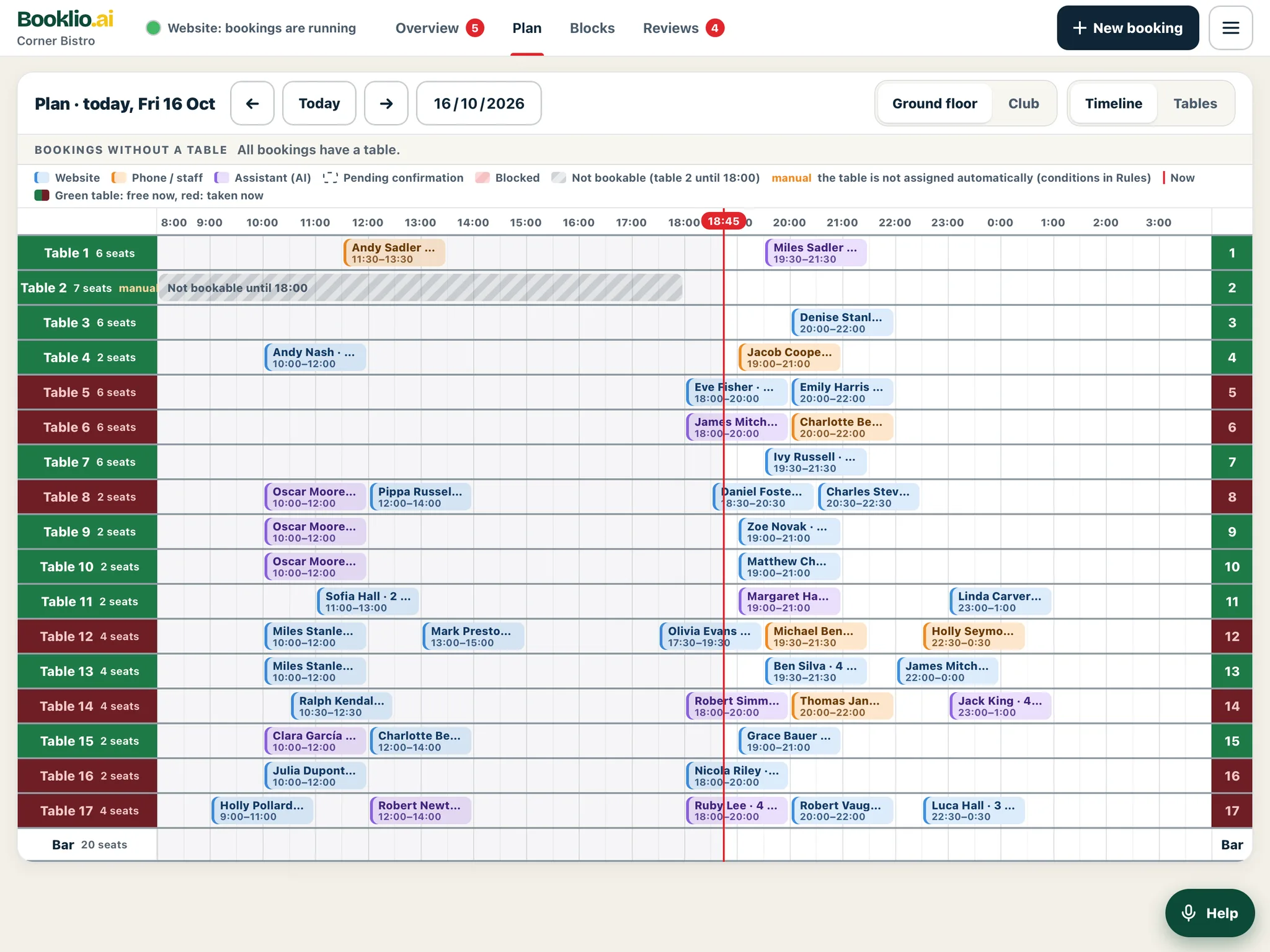
Bar colour in the plan:websitestaffAI assistant
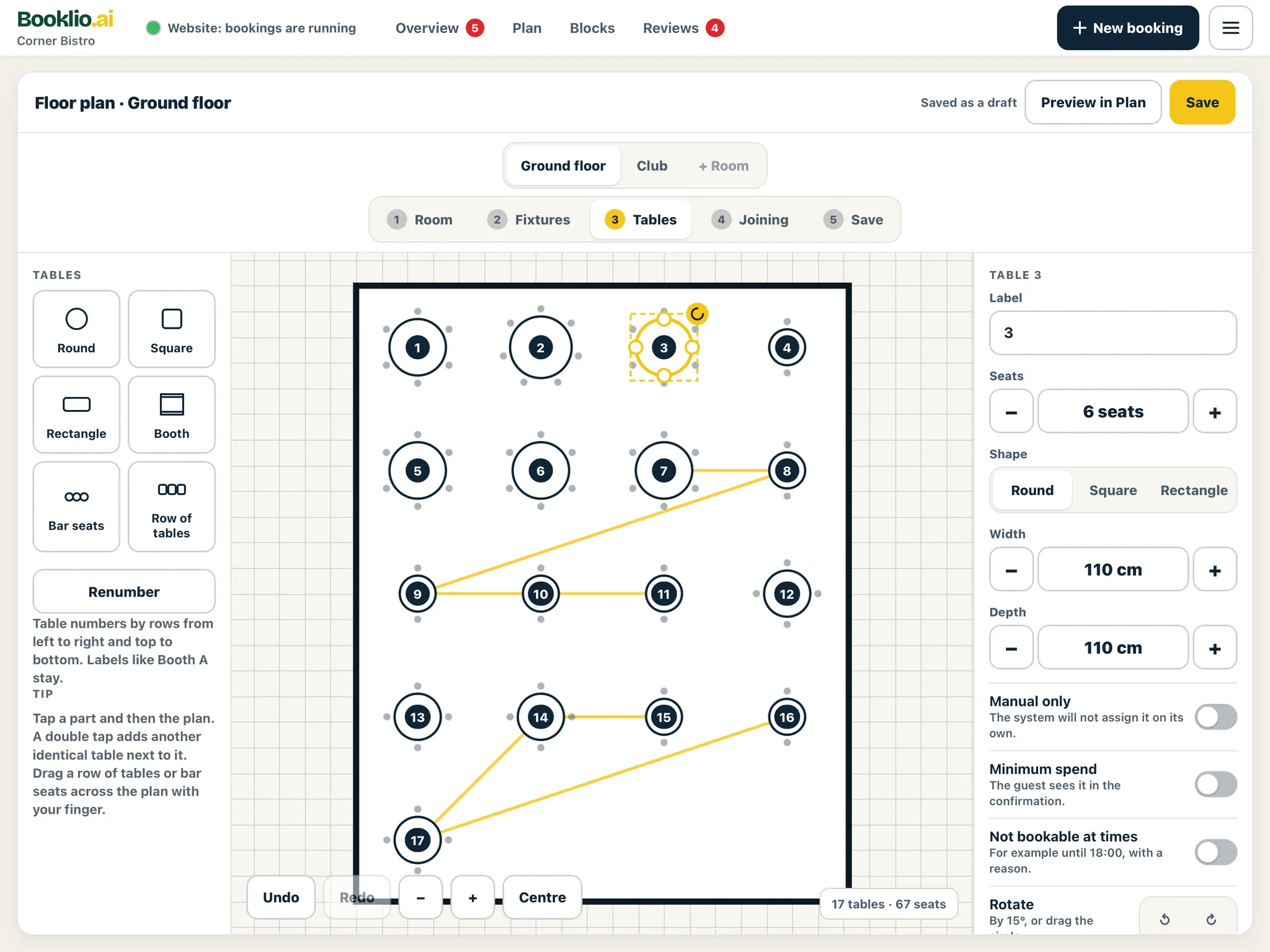
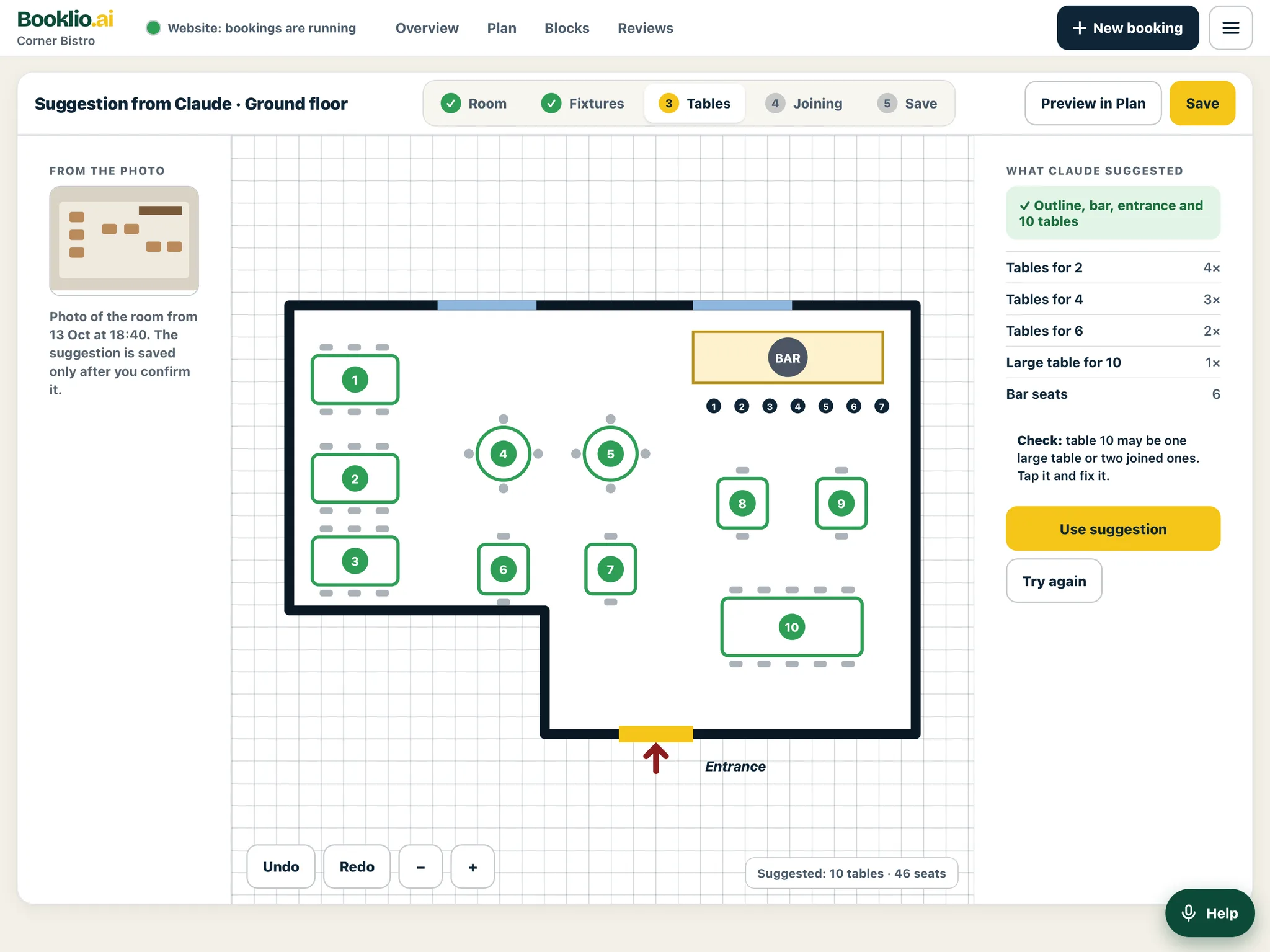
Booklio only offers the tables you actually have, so it knows your floor plan. Snap your plan, build the room from parts, or let AI suggest it. It takes a few minutes and you can change anything.
How the floor plan editor works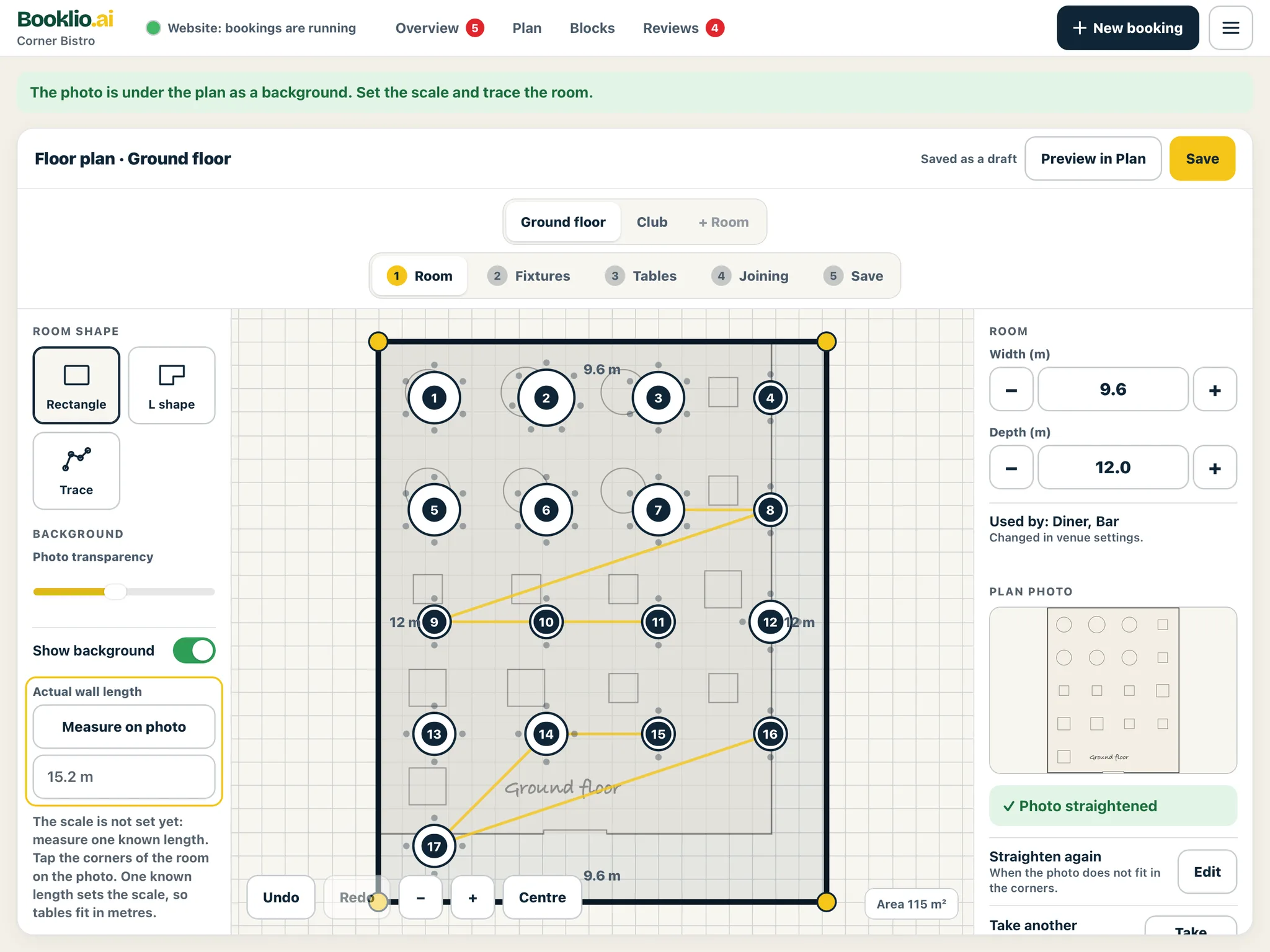
about 3 minutes
Take a photo of the evacuation plan on the wall or your architect’s drawing with the iPad. The photo gets squared up, one known wall sets the scale, and you trace the room by tapping its corners.
about 5 minutes
Drag the room shape, bar, entrances and tables from the palette onto the grid with your finger. Tables number themselves, and you set seats and rules for each one.
about 1 minute
Snap your plan or the whole room and AI suggests the outline, bar, entrances and numbered tables with seat counts. It flags anything it’s unsure about; you fix it and save.
The admin has a Help button. Say what you’re looking for, like “where do I set up the no-show list”, and the helper takes you there and explains in two sentences what’s where. Say “add a booking for tomorrow at 7 pm for four” and it gets the booking ready for you to confirm. Prefer not to talk? Type it. Free.
What else the admin does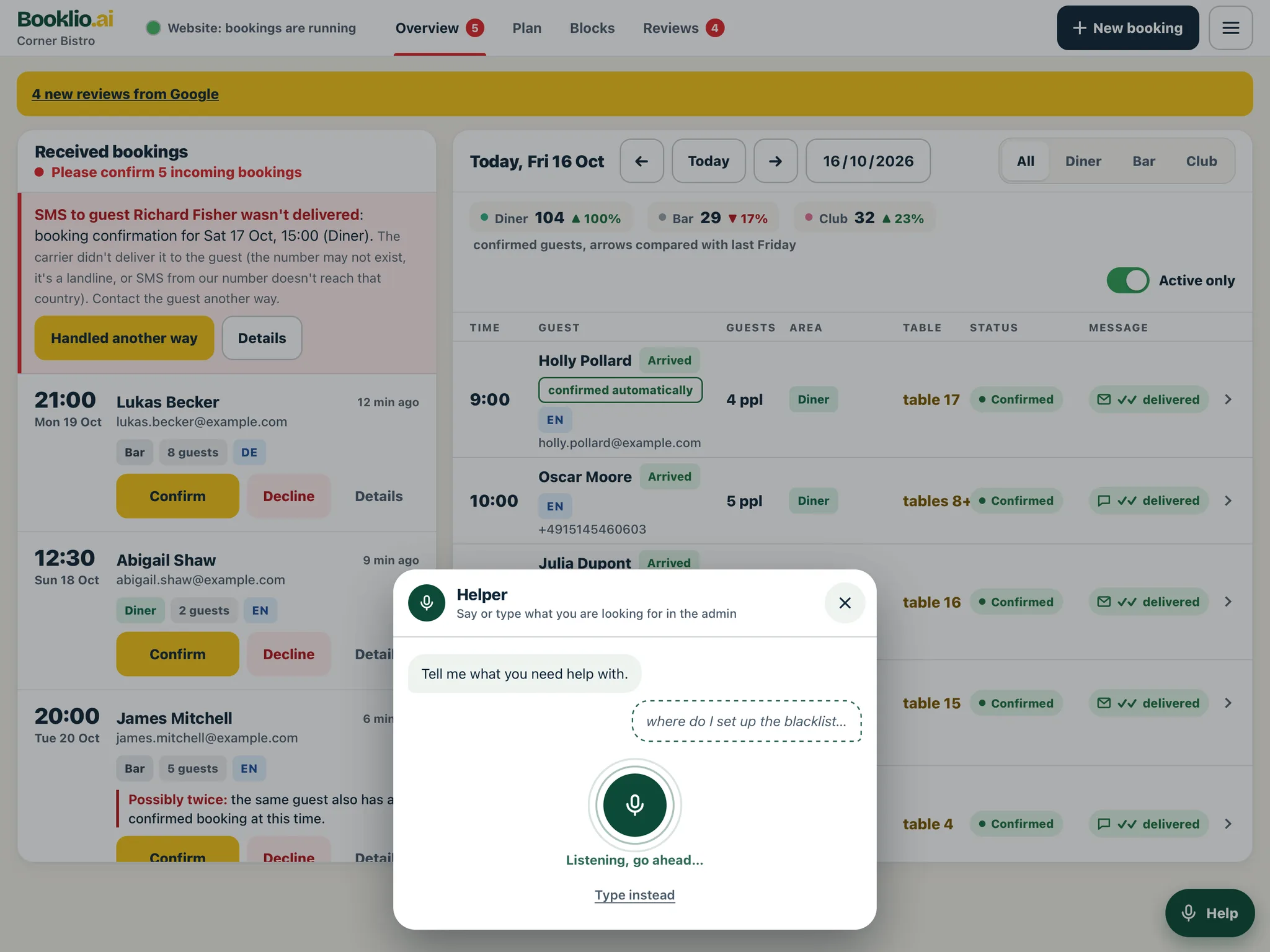
Tap Help and say it in your own words. Prefer not to talk? Type it.
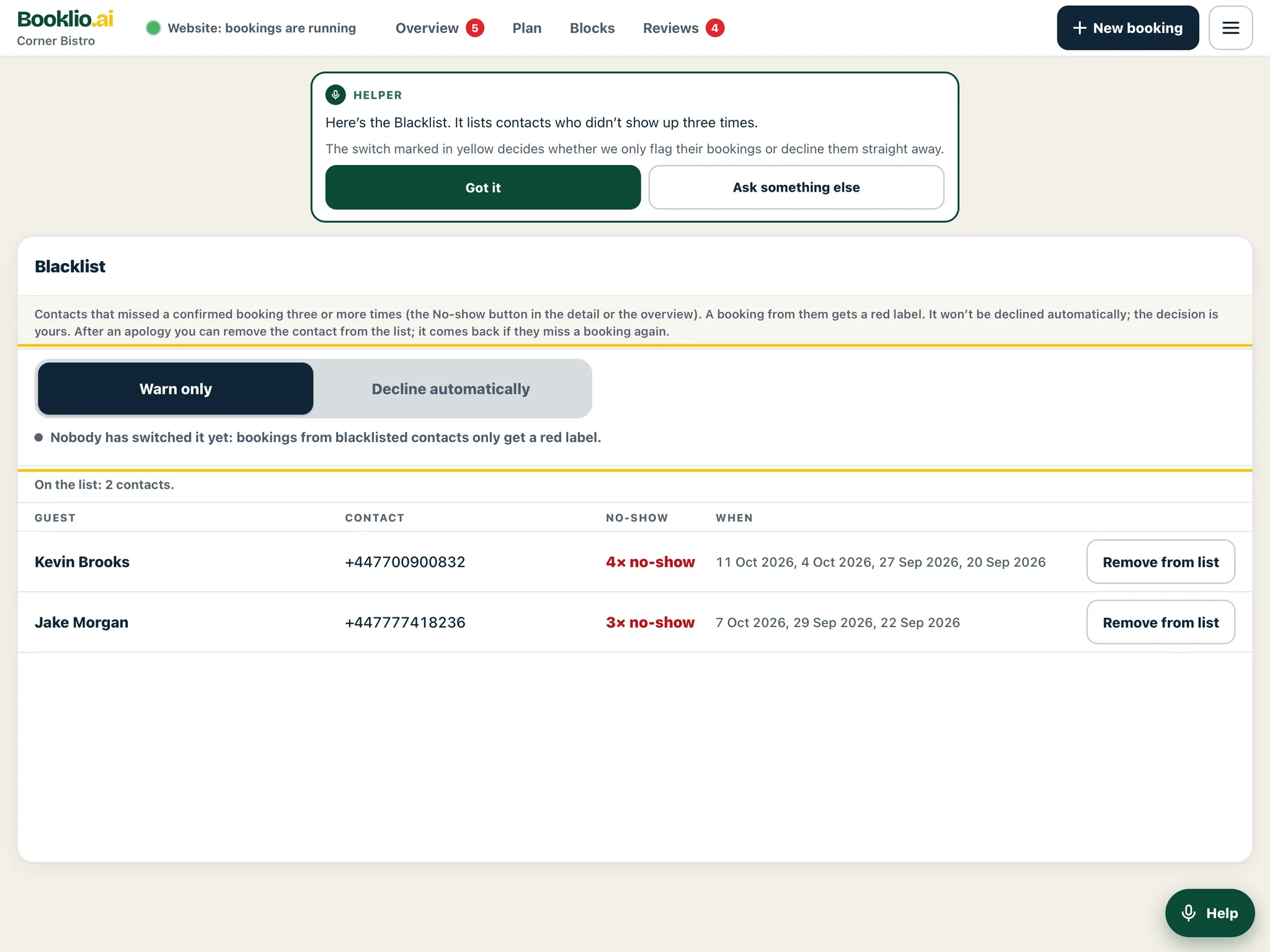
It opens the right page, explains in two sentences what’s where, and outlines in yellow what to tap.
Stats
Booklio measures bookings and website traffic on its own, with no cookies and no third-party services. Every number leads to a decision: where to spend on promotion, what to fix on the website and how many tables to offer online.
Tap the iPad: switch between bookings and traffic and open the details, just like in the real admin.
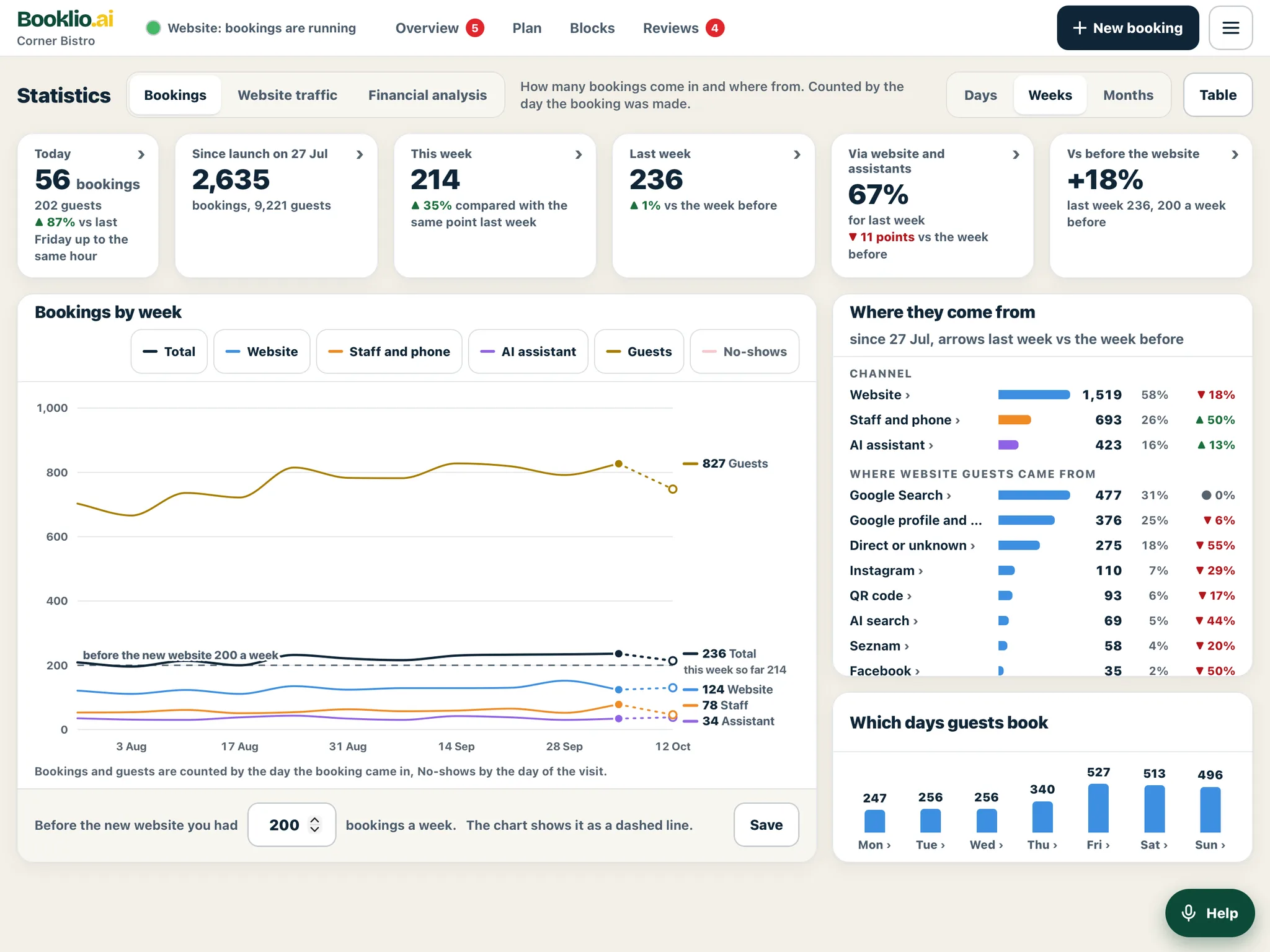
MeasuresBookings and guests by day, week and month, split into website, staff and phone, and AI assistants. Compared with the time before Booklio, plus the days guests book for most often.
So you canSee how much work the website saves, and plan shifts and events around your busiest days.
MeasuresThe source of every booking and visit: Google Search, Google profile and Maps, Seznam, Instagram, Facebook, TikTok, AI search, the QR code on the table and partners.
So you canSpend on promotion where guests actually come from, not just clicks.
MeasuresVisits and what people did (opened booking, called, navigated, emailed), top pages, devices, languages and countries. Plus a live “On the site now”.
So you canTell whether your website leads people to book or just informs them.
MeasuresHow many visitors opened the widget and how many got through each step to sending, with the most common errors by field.
So you canSee exactly where guests drop off and what to fix.
MeasuresHow fast the website loads for real guests on phones and computers, rated the way Google rates it.
So you canKnow right away when a slow website starts putting off guests and Google.
MeasuresHow many guests scanned the QR code on the table that leads to your Google review form, over the last 30 days. Every table has its own code, so you know which table a new review came from.
So you canThank the actual guest for praise, sort out a complaint with them directly. Change the target without reprinting.
Last week at a glance: bookings and guests by source, change from the week before, your busiest days, website traffic, how fast staff answered and new reviews. The week’s numbers without opening the admin.
Most guests never write a review simply because nobody asks them at the right moment. Booklio asks for you.
Guests scan the code and land straight on your Google review form. From the table and time, Booklio works out which booking most likely wrote the review.
After the visit, guests get an email or text asking how it went. You see the feedback in the admin, and every guest is offered a public review.
Claude drafts the reply on Google and TripAdvisor; you just approve it. Nothing goes out without you.
Its own MCP server
Booklio has its own MCP server, a connector Claude and ChatGPT can use straight away. Guests add it to their assistant with a single link. The assistant checks free times, shows the menu and sends a request that follows the same rules as the website. Management can ask their own assistant too: what’s waiting for confirmation today, who’s at table 5, close Saturday from 3 to 9 pm.
How booking through ChatGPT and Claude worksAn American diner, bar and Music Club in the heart of Prague. Three spaces, three sets of hours, from breakfast until 6 am. Booklio handles every booking there.
How it works at James Dean
„Since we started using Booklio, bookings are up 162%. Routine requests confirm themselves, and the bar staff can look after guests instead of the phone.“
Operator of James Dean PragueYes. The core and all 9 add-ons cost €0 a month. You pay only for text messages to guests (€0.12), drafts by Claude (€0.12) and floor plans suggested by AI (€0.20), all excluding VAT and only for what you use. Emails to guests and bookings through guests’ AI assistants are free.
No. With auto-confirm on, routine requests confirm themselves: up to 6 people, no special requests, not last-minute, and with a free table. Staff handle the rest, and the guest is promised an answer, usually within 60 minutes.
Not at peak times. Management sets what share of tables the website offers (50 to 100%); the rest is kept for walk-ins.
Staff decline with “We’re full” and offer another free time that day. The guest accepts in one tap and the booking is confirmed on the spot.
Staff mark the guest as a no-show. After three, the contact shows up on the no-show list. One switch declines their further requests automatically; otherwise staff decide.
No. Booklio has a standalone booking page you can link to, from Instagram, Google Maps or your business card.
For guests: Czech, English and German, across the widget, texts and emails.
Yes. The guide follows the country you’re based in: it sets the time zone, the phone prefix, a company registration number instead of the Czech IČO, and the right name for your VAT ID. The admin and the setup guide are in English or Czech, and the guest page runs in Czech, English or German. You pay in euros; venues in the UK pay in pounds and in the US in dollars.
Booklio was built for James Dean Prague and runs there every day. We’re now opening it to other venues.
Regular bookings need no deposit. A bottle table paid upfront is an optional add-on; it’s built and waiting for payments to be switched on.
Yes. Put a QR code on every table that takes guests straight to your Google review form. When a new review comes in, staff see which table and booking it most likely came from, so they can thank the guest or sort out the complaint. Claude drafts the reply and a person approves it. After the visit, Booklio also checks how it went, with the feedback in your admin and an invitation to every guest to review you on the platforms you choose.
Signing up takes a few minutes. The guide in the admin then helps you set your opening hours, spaces and tables in about 5 minutes, and pasting the code into your website takes another 2.
Sign up, set up your venue in the guide and swap the old code on your website for Booklio’s. Bookings you already have in the old system go into the admin through New booking. Both systems can run side by side for a few days until the old bookings are done.
Any time, with no fee. Just write to us and we’ll end Booklio on the day you choose, within a month at the latest. The details are in the terms of service.
Your venue is responsible for guests’ data as the controller; Booklio processes it as a processor under the terms of service. Every venue has its own database. When you leave, we hand the data over on request and then delete it.
Not ready to sign up yet? Send us a message and we’ll reply by email.
Free, and on your website within 15 minutes. Fill in a few details and confirm your email. Booklio sets itself up; in the admin you add your tables and opening hours, then paste the code into your website.
Get Booklio free