Everything Booklio does.
11 areas, from the guest’s booking widget to the owner’s numbers. Anything still in the works is marked.
Booking on your website
A booking widget guests get through in a minute.
Only times the party fits into.
Full slots are marked “full” and can’t be picked.
Day and time in one tap.
Today, tomorrow and two more days, a calendar a year ahead, half-hour slots.
Phone or email.
Country codes for every country, searchable. It spots landlines in eight countries, including Czechia, Germany and the UK, and asks for a mobile instead. For countries texts can’t reach, the widget asks for email.
An honest promise.
“Confirmation on its way” only when the booking really confirms itself.
Czech, English, German.
The widget follows the page language, and so do the messages.
Standalone booking page.
For venues without a website, with your logo and contact details.
Widget on any website.
Two lines of code from the setup guide in the admin, for WordPress, Wix, Webnode or your own site. The widget picks up your site’s colours and fonts.
Add to calendar.
After booking, guests save the date to their phone calendar or Google Calendar in one tap.
Capacity rules
Only offer what you can deliver.
Free times from real tables.
The system accounts for table sizes and combinations, and two guests can’t grab the same last table at once.
Minimum lead time.
Online bookings at least 60 minutes ahead, adjustable. Anything sooner goes by phone.
Online capacity at peak times.
The website offers 50 to 100% of tables and holds the rest for walk-ins.
Table hold.
How long a booking holds a table, 2 to 4 hours. Before a change, the system shows which bookings would overlap.
Blocks.
Close the venue, a space or specific tables, all day or for a time window. The website and assistants follow at once.
Multiple spaces, different hours.
Restaurant by day, bar into the night, club until morning, each with its own rules.
Confirmation
Routine bookings confirm themselves. Exceptions stay with you.
Confirm or decline.
One or two taps, and the guest gets a friendly message in their language.
Auto-confirm.
Requests that meet the rules are confirmed in seconds and get a table. The rest wait for staff.
Short notice is always manual.
Less than 3 hours before the booking, a person who can see the room decides.
“We’re full” with another time.
Up to 6 free times that day; the guest accepts in one tap.
Watching pending requests.
A tag and red banner after 30 minutes, an email to staff after 45.
Possible duplicate.
Flags a second request from the same guest for the same time.
Guest messages
Guests hear about every change where they’ll actually see it.
Text or email.
Based on the contact, in three languages, with proper Czech forms of address. Texts to UK numbers, and invitations and post-visit messages in Czechia, come from a sender showing your venue’s name.
Reminders.
At 9 am on the day, or 6 pm the day before for morning bookings, with a cancel link.
Delivery receipts.
Staff can see whether the guest got the message.
Resend.
Failed or undelivered messages show at the top, with who to call and why.
SMS credit alerts.
In the admin and by email, before credit runs out.
Prepaid credit.
The Credit page shows your balance and how many texts and Claude drafts you used this month and last, in units and CZK, plus how many of your 3,000 monthly emails are left. Top up by bank transfer with a QR code, and get an email when credit runs low. Card payments are coming soon.
Test mode.
A new venue can try everything without a single message going out.
Copies by email.
New and changed bookings and cancellations also reach staff by email; switch it off in the menu.
Self-service for guests
Fewer phone calls, fewer empty tables.
One-tap cancellation.
The link is in the confirmation and the reminder; the table frees up right away.
Editing a pending request.
Guests can change the party size or name without creating a second request.
Accepting another time.
A declined request becomes a confirmed booking in one tap.
Unsubscribe from invitations.
One button, in the email or right in the mail app.
Booking through AI assistants
Guests book even where they never open your website.
Its own MCP server for Claude and ChatGPT.
Guests add the connector to their assistant and ask about free times, the menu and the venue.
Same rules as the website.
Capacity, blocks, lead time and auto-confirm all apply.
Flood protection.
Hourly and per-contact limits, a surge alert and a switch for the whole channel.
Bulk spam rejection.
Clear out fake requests in two taps.
Guest how-to.
A page on adding the connector, in three languages.
Listing in assistant directories.
The materials are ready; the Claude listing is under review, ChatGPT not yet submitted.
Cancel through the assistant.
Guests cancel as easily as they booked through their assistant.
Payments and sales
Extra sales without an online shop.
Gift cards.
Vouchers and top-up cards ordered online, picked up at the bar or sent by post.
QR bank transfer.
The confirmation email carries a QR code for the banking app.
Table with a bottle, paid upfront.
Guests pick a bottle from your drinks list for a booth, pay by card through Stripe, including Apple Pay and Google Pay, and the booking is confirmed instantly.
Clear refund rules.
If the venue cancels, the money goes back automatically; guest cancellations and no-shows don’t get refunds.
Booking extras.
Guests add an offered item to their booking, like a discounted drink, and pick it right in the widget. A switch in the admin menu turns the picker on; it starts off.
Gift cards on your website.
Guests order gift cards right on your website, vouchers only if you like.
Gift card orders in the admin.
Paid, collected and posted cards in one place.
Events and invitations
Add an event once. Your website, search engines and guests hear about it on their own.
Events live in two minutes.
With structured data for search engines and change notifications.
Translations by Claude.
Event name and description in English and German, checked by staff.
Invitations to guests.
By email and text, with a cost estimate, respecting unsubscribes.
Invitations by the book.
Marked as marketing, sent in your company’s name, with one-tap unsubscribe.
Sent in batches.
Between 9 am and 7 pm, so invitations never use up the sending limits needed for booking confirmations.
Events on Google, Instagram and more.
Coming soonPublishing to Google Business Profile, Instagram, Facebook, TikTok, GoOut, Firmy.cz and Apple Maps.
Staff admin
The iPad behind the bar, as an app.
Home-screen app.
No app store needed, with alerts even on the lock screen.
Bell and badges.
New bookings ring; pending work is visible from every screen.
Today at a glance.
Pending cards on the left, the day’s list on the right.
Floor plan: timeline and map.
Who’s sitting where, what’s free and when a table opens up.
Tables on a grid.
A new venue lays out its tables on a simple floor grid, and the Floor plan and online party limit work from it straight away.
Floor plan editor.
Build your room from parts in the admin: room shape, bar, entrances and tables from the palette, numbering, seat counts, table rules and which tables can be joined. The Floor plan, new bookings and the widget’s free times all follow the saved layout; saving takes the manager code. You can also snap your plan with the iPad: the photo gets squared up, one known wall length sets the scale, and you trace the room by tapping its corners. A layout suggested by Claude arrives in the next version.
Phone bookings.
Logged in about 30 seconds, with a table already suggested.
Arrived, no-show, no-show list.
After three no-shows the contact is flagged; staff decide.
Auto-decline for repeat no-shows.
Switch it on and new requests from a contact with three no-shows get declined automatically, from the widget and from AI assistants. The guest gets a polite message with no mention of the list, and staff can still accept the booking. Off by default.
Night mode.
Automatic from 7 pm to 7 am, or switch it manually any time.
Edit a booking.
Change the time, party size or table in the details; the guest gets a message about it.
Guest database.
All your guests in one list, a review badge on those who left one, a Reviewed filter, and GDPR erasure in one tap.
Website status.
A dot in the header shows whether the widget is working out times and guest messages are going out.
For owners and managers
The numbers, without opening the admin.
Booking stats.
By day, week and month, by channel: website, phone, AI assistant. The chart also shows guest numbers and no-shows.
Where guests come from.
Google, Maps, Instagram, the QR code on the table, AI search and more.
Traffic and the booking funnel.
No cookies, so your site needs no consent banner for it. With widget steps and real-visitor page speed.
Traffic stats for your own website.
One line in your site’s header: pages, where guests come from, device, language, load speed, taps on phone, email, map and socials, and every booking step up to sending. No cookies and no stored IP addresses, even on sites that switch pages without a reload.
Monday summary.
An email with the week’s numbers, every Monday from 8 am.
Revenue view.
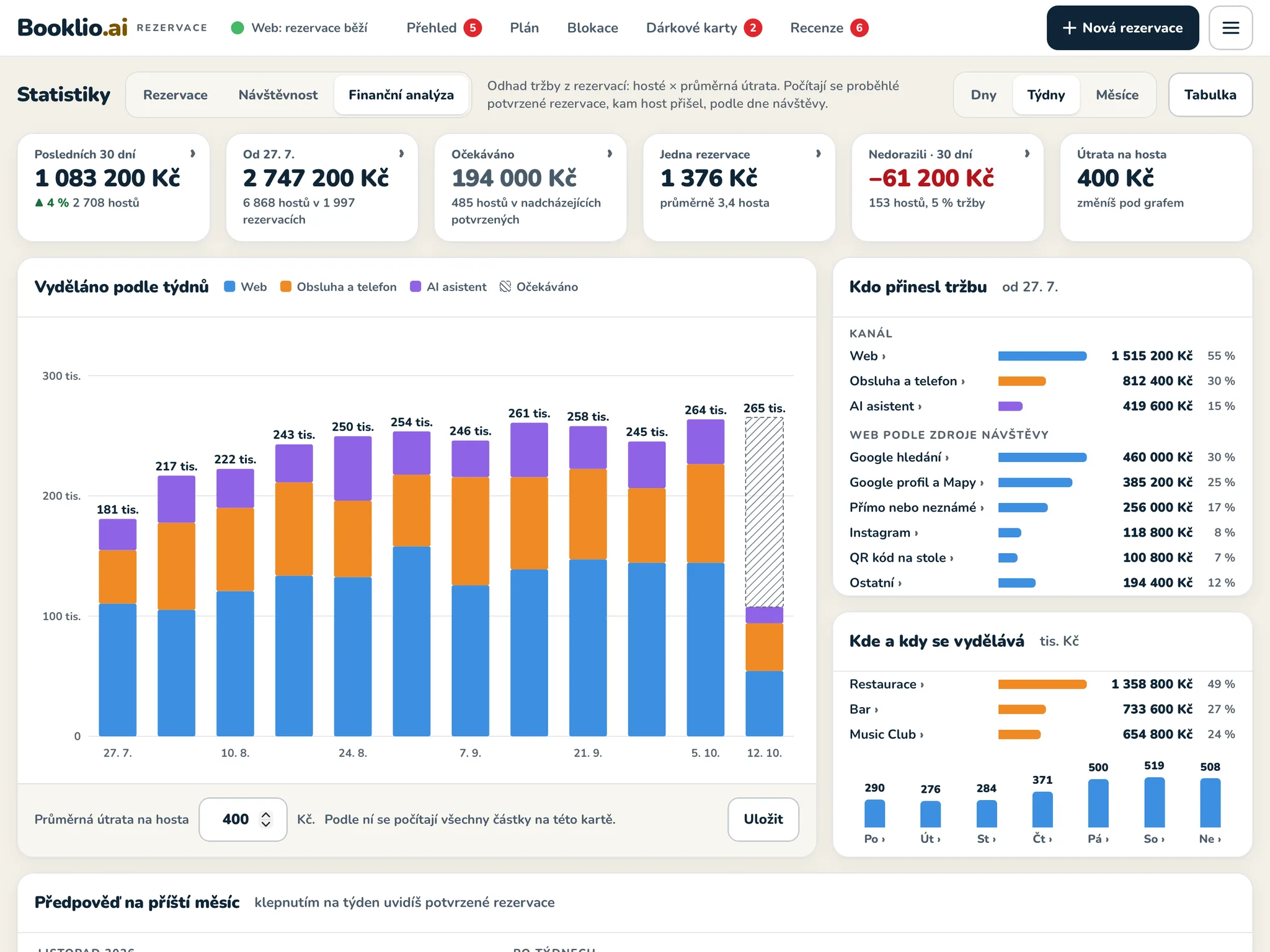
Estimated revenue from bookings (guests times your average spend per guest), which channels brought it, where and when, plus a forecast for next month with a range.
Website audit.
Your Google position for the keywords you pick (from Search Console), key metrics against targets, a weekly summary with tips drawn from your data, and an archive of weekly audits with suggestions. Behind the manager code.
Audit, reviews and QR codes, all self-serve.
If you set Booklio up yourself, you switch on the Audit with your own Search Console and keywords (summary emailed every Monday), the after-visit check-in and table QR stickers right in your venue settings.
Manager code.
Only management can change the rules that affect revenue.
Staff assistant.
Claude, connected to the admin, answers questions such as how many guests came and who didn’t show, finds a booking by the guest’s name, and makes changes once staff approve.
Partner links.
A hotel or hostel gets its own QR code, and you see how many guests it sends.
Only the add-ons you want.
A switched-off add-on disappears from the widget, the admin and the assistants.
Venue rules.
Every setting explained on one page, with search.
Setup guide and venue settings.
The first time you log in, a guide walks you through opening hours, spaces and tables. Venue details, the email guests see and the online party limit are yours to change in Venue settings.
Owner login by email link.
The emailed link works once, for 15 minutes. The owner then sets the staff iPad password and the manager code.
Reviews
Many times more reviews, and a reply in a minute, not half an hour.
Who wrote that review.
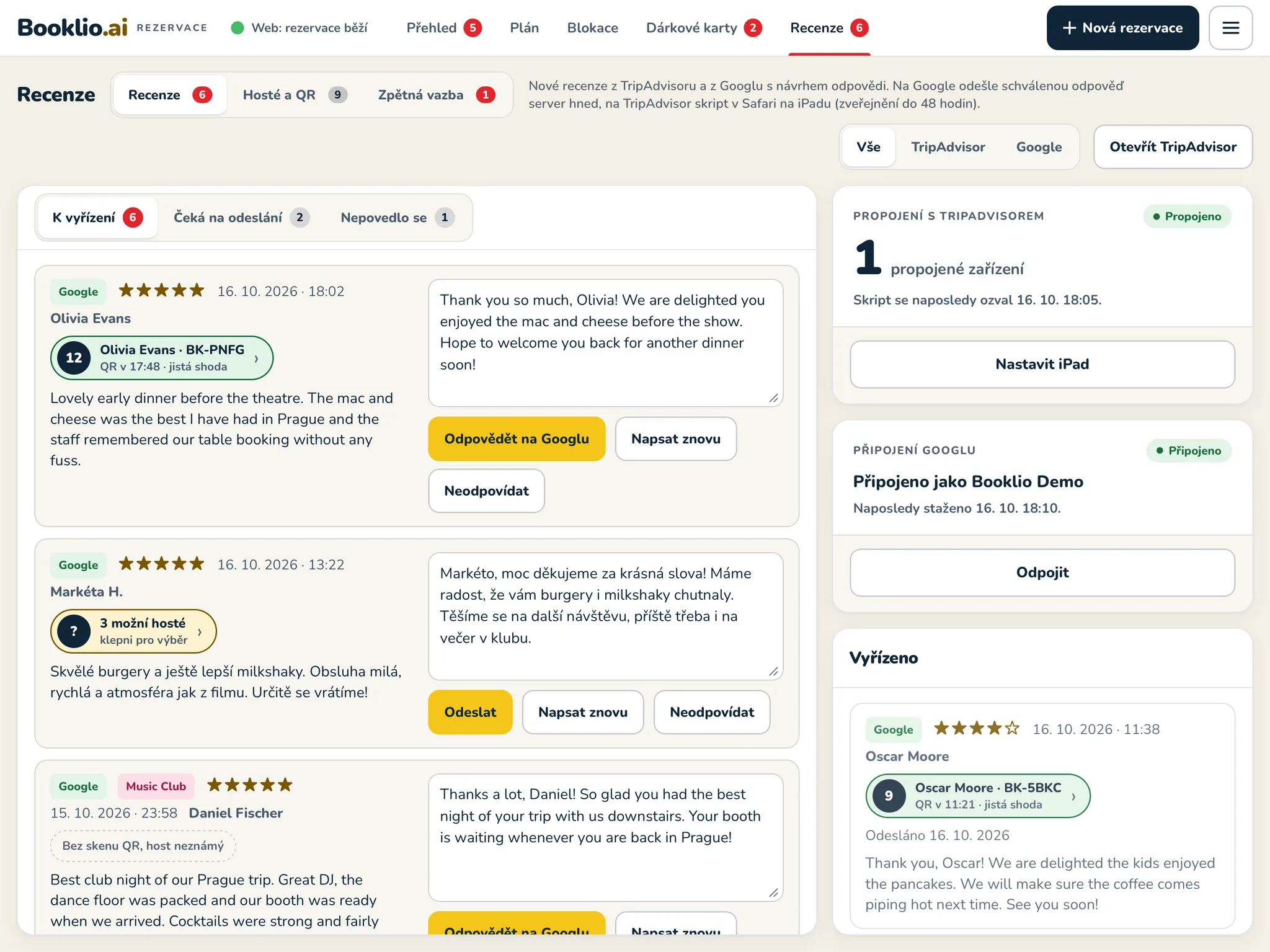
A guest at table 7 scans the QR code and leaves a Google review. Booklio matches the table and scan time to the booking seated there, so staff see the name, table and booking right next to the review. Thank guests for praise, sort out complaints. The scan stores nothing about the guest, and only staff see the link to the booking.
Sure match or possible match.
A match only counts as certain when the reviewer’s full name fits exactly one guest. Otherwise Booklio suggests likely guests, and staff confirm or unlink them in one tap. Guests who tapped through to Google from the post-visit message are suggested too.
Guests and QR.
Every table scan on one line: table, guest, booking and the review with its stars, next to a floor plan coloured by rating. The guest view puts the booking, scan and review on one timeline.
A QR code for every table.
The admin prints stickers for every table, and for a second Google profile such as your club. The code takes guests straight to the review form.
Google reviews.
Pulled in from Google Maps automatically about every 6 hours, even for several profiles of one venue.
Reply on Google in one tap.
A script in Safari on the iPad opens the review in Google’s review manager and fills in the approved reply. Staff just hit publish.
Direct Google connection.
Pulling reviews and posting replies straight through Google’s API, no script needed. Built and waiting on Google’s access approval.
TripAdvisor reviews.
Pulled in automatically about every 6 hours.
Replying on TripAdvisor.
The same Safari script posts approved replies to TripAdvisor too. When a new version is out, the admin tells you, and updating takes one tap.
Reply drafts by Claude.
In the review’s language, friendly and specific. Sensitive topics go to management.
Nothing goes out unapproved.
A person signs off on every reply, and reviews sit behind their own password.
To do, Waiting to post, Failed.
Reviews on one panel with tabs and counts, so you see at a glance what’s left.
How was your visit?
After the visit, Booklio asks guests by email or text how it went and offers every guest a Google or TripAdvisor review, with a link straight to the review form. You see the feedback in the admin by day, area and table, get an alert about low ratings, and Claude drafts your reply to the guest.
A thank-you discount for feedback.
Guests who fill in the post-visit questionnaire get a discount code for their next visit, whatever star rating they give. You set the amount and how long it lasts behind the manager code, one code per contact every 30 days. When the guest books again from the same phone or email, the booking shows a discount badge and staff redeem it with one tap; they can also check a code from the guest’s phone without a booking. The reward is for your own questionnaire only, never for a Google review.
With Booklio, you get a tool you’ve never even dreamed of.
Free, and on your website within 15 minutes. Fill in a few details and confirm your email. Booklio sets itself up; in the admin you add your tables and opening hours, then paste the code into your website.
Get Booklio free